Win an All-in-One Photo Printer from Epson and Create Memories

Posted by Mamanista on Nov 28, 2007 | 98 Comments

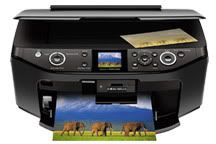
All-in-One RX595 Photo Printer from EpsonImagine snapping holiday photos, instantly printing them for a family scrapbook, and creating photo thank you notes for all the generous gifts.

You can do all of this and more–printing, copying, and scanning, with or without a computer–with the EPSON Ultra Hi-Defiition RX595 Photo All-in-One.

Even without a computer, you can print a proof sheet, select the photos you wish to print, use an auto-correct feature (which includes face recognition so those sweet little mugs really shine), crop, and create special projects, like photo cards. You can also scan and restore old faded photos and give your memories new life.

We are trying to decide which super cute photo of Baby Diva to use for our Holiday cards, and it so much easier to compare shots when you have actual prints on hand. The Epson RX595 quickly accessed the images from our memory card, corrected the contrast, and brightened her face, then printed out copies of our top contenders so we could make our choice. In the default setting, the RX595 produces photos at a speedy 21 seconds.

If you are like me, you have tons of adorable photos sitting around on your computer, and perhaps some sitting around in boxes, but you never get around to using them. With this printer, you can print your photos when you need them and immediately use them in a variety of projects.

Because the printer is an all-in-one, small business owners and school children can create, print, and copy professional looking materials. One of my favorite features is the ability to print directly on a CD/DVD without fussing with labels.

To get even more creative, just get a USB cable to connect your computer and hop on over to the Epson CreativeZone, where you can craft photo projects, using free templates for photo cards, scrapbooking pages, party invitations, and more.

A big concern with printers is the cost of ink, but EPSON uses six separate cartridges, so you only replace the colors that have run dry.

Because the EPSON Ultra Hi-Defiition RX595 Photo All-in-One has so many functions and possibilities, it is perfect for a home business owner, scrapbooker, or a family with school-aged children.

Buy the EPSON Ultra Hi-Defiition RX595 Photo All-in-One

This convenient printer normally retails at $149.99. Right now there are some amazing deals with instant rebates, bringing the printer to under $100.

You can purchase the RX595 directly from Epson, or at electronics stores, such as Buy.com, Circuit City, or Best Buy.

WIN the EPSON Ultra Hi-Defiition RX595 Photo All-in-One

To finish off our 12 Days of Giveaways, Epson is giving away a prize the whole family can use. U.S. Shipping only for this contest. To enter for a chance to win EPSON Ultra Hi-Defiition RX595 Photo All-in-One, you must complete both of these steps:

  1. Share: Click here to find out how to share the fun. You only have to share the 12 Days of Giveaways once to be able to enter any or all of the twelve contests–you do not need to be a blogger to play! Just remember to visit again to comment on the giveaway posts individually.
  2. Leave a Comment: Visit Epson and leave a comment on this post telling us which feature of the RX595 you would use first. Remember to leave a valid e-mail or URL where we can reach you (OR use a nickname and then let us know). Complete both steps by Monday, December 10, at 11:59 PM EST and you’ll be entered for your chance to win this prize!

Don’t miss out on a single fabulous giveaway, hip review or amazing deal: subscribe to Mamanista! by e-mail.

Share and Enjoy:
  • E-mail this story to a friend!
  • StumbleUpon
  • del.icio.us
  • Kirtsy
  • TwitThis
  • Bumpzee
  • Digg
  • Reddit
  • Sphinn
  • Mixx
  • Google
  • NewsVine
  • Technorati
Get More Reviews, Contests and Discounts. Subscribe via:
Daily Email Digest | RSS


Other Fabulous Posts:

Leave Your Response

Add your comment below, or trackback from your own site. You can also subscribe to these comments via RSS.

You can use these tags:
<a href="" title=""> <abbr title=""> <acronym title=""> <b> <blockquote cite=""> <cite> <code> <del datetime=""> <em> <i> <q cite=""> <strike> <strong>

This is a Gravatar-enabled weblog. To get your own globally-recognized-avatar, please register at Gravatar.

  • Shannon said:

    I would definitely start with cropping and then enlarging photos of my daughter to then frame and give as Christmas presents.

    Great contests…thank you so much!

  • sara said:

    I absolutely love the fact that you can do almost anything with your pictures (my favorite being cropping!) without having to use the computer! I would also use the scanning feature alot to scan some of my pictures from before my digital camera debut to use for scrapbooking! If I had something like this, I would definitely get alot more done with my pictures! And it really seems like a great value for your money! Thanks for the great review and the awesome chance to win this!
    sblilly14(@)yahoo(.)com

  • brandy w said:

    i would definitly use it to start printing christmas photos and pics of my new baby due any day.
    bwalleshauser@yahoo.com

  • Sheila said:

    I would use the cropping and printing photos first, I have so many pictures on disc that need to be formatted and printed out and this would be amazing to work with !

  • Jen said:

    I think it would be great to print off all the pictures on my camera and be able to enlarge them so I can frame them and give as gifts!!!

  • superfizz said:

    I would love to restore some old photos using this! Great printer!

  • paula h said:

    I would use the crop feature to cut out some of the background. This looks like such a cool printer.

  • CrystalGB said:

    I would print out some of the pictures stored on my digital camera.

  • DePro said:

    Printing photos.

  • Brit said:

    I love to blog, but I also love to put our photos in albums since I’m not a big scrapbooker. I would love to print off all our photos and put them into albums and the fact that you can crop and auto correct on this thing is awesome!

  • Columbia Thorndale said:

    I love the isea of Restore old, faded color photos. I have tons that I would love to get the colour where it used to be but over the years have fadded away.

    COLUMBIA THORNDALE
    columbiathorndale@yahoo.ca

  • Diane said:

    Oh, I’d definitely make the greeting cards for Christmas! I wanted to do photographs for our cards this year.
    themommyspot(at)gmail(dot)com

  • Eipryl & Aureliano said:

    We have a ton of really old family photos..so I’m very interested in the “restore old photos” feature. Although, I’d also love to do some great greeting cards for Christmas.

  • Jean said:

    This would be awesome. I just love that it’s all in one scanner, printer, image editer the whole sha bang. I might actually print out my photos for a change. I would use the scanner a lot to scan in old photos.

  • Ryan and Vanessa said:

    Christmas cards, most definitely. We’re starting a photo Christmas card series this year. We’ve been working on restoring our old house and this will be our first Christmas in this house. We’re taking a family photo on the front porch each year so you can see the progress (at least the outside progress) year after year.

  • Jean S. from Merion, PA said:

    I would use it to print photos of my grandson (due in March)

    Jean S. from Merion, PA

  • Sarah said:

    I love the all in one…it is so easy! Take care of pictures right away…instead of piling up.

    I also like the feature of:
    Smudge, scratch, water and fade resistant photos with Claria ™ Hi-Definition Ink
    Great giveaway! I hope you pick me! This is so generous!!

  • lace said:

    The crop feature is wonderful. One of the features I think I would use the most is the enlargment feature. I would love to have bigger pictures of my favorites and hang them on the wall.

  • denyse said:

    Pick me- I love the fade resistant feature!

  • Shannon said:

    Hey I love this giveaway. The feature I like best is -Print photos directly from memory cards, USB flash drives and PictBridge® cameras/phones. Very Handy!
    Please enter me in this giveaway.
    I love it.
    Thanks

  • ProphetMother said:

    OMG! I need this like NOW! I love the fact that it can print straight from the camera, bypassing the computer. Basically, everything about it is SA-WEET! Thank for this giveaway!

  • Shama-Lama Mama said:

    I would print out a multitude of photos I have been only looking at on the computer. I want to hang some on my walls. I love that they are fade resistant. So many of my printed pics have changed color. We could really use this! Thanks!

  • aBookworm said:

    Restore old, faded color photos – PC-free — this would be my first pick! I have some old photos of my dad and granddad that are really faded and I would love to restore them and show them to my kid, so he can see his elders.

  • marshwins said:

    WOW, what a printer!!! I wanna win this bad boy!!!!

  • Brooke Lorren said:

    I would want to print some beautiful Christmas photos… after that I’d want to scan and retouch some old pictures.

  • pancak said:

    I would start with cropping and touching-up a bunch of my digital photos, then print them off at lightspeed to enjoy OFF the PC.

  • janetfaye said:

    I would use it to print pictures of my new grandbaby twins.

  • Naomi said:

    I would scan some old prom pics… scary!

  • Andrea said:

    Cropping, enlarging, printing, scanning, touching up… I’d do it all!!!

    http://momtothefey.blogspot.com

  • Rachee S. said:

    Pick me! I hate having to download my pictures first!

  • nor_lou said:

    I would use the scanner first. I want to make a scap book of my mom with my girls and the first couple of picture will need to be scanned.

  • Tanja said:

    First to print some photos, than to scan and rstore some old photos :)
    Thanks for the great giveaway today!

  • Betty said:

    There is so much to do, and without using a computer!! I’d start by restoring some of my old photos and then scan and print them to share with my family.

  • Bebemiqui said:

    I’d have to start with cropping! I always ignore that aspect!

  • Marquel said:

    What wouldn’t I do first?! I just had a baby (5 yrs ttc), so as you can imagine, I’ve been going crazy with all the picture taking!However, the pics will linger on my camera for quite some time before I can make it on over to CVS to get prints made. Being able to print his pics from home with the USB would be such a HUGE convienance!! I think I’d start by trying that feature out. I’d be extremely grateful for such a much needed & wanted gift.

  • Krista said:

    The first thing I would do would be to PRINT the thousand or so baby pictures I have on my computer and send about half of them to the great-grandparents. Especially the ones who don’t have internet access and can’t see the ones I post on my blog.
    Then I might get creative with cropping, but I like to crop after the fact and have some small pictures.

  • The Saunders Family said:

    i would probably use the scanning feature, since I have a plethora of non-digital photos, that are in dire need of some attention!

  • Meldrims said:

    I would be printing off our Christmas pics and the pics I need for my nephews photo ABC book.

  • Kristen said:

    My mind is buzzing with all the projects I could complete with this printer. The most obvious feature I would use is to actually print out pictures to display instead of keeping them locked up in the computer.

  • SJ said:

    I would print off photos that I’ve personally taken, frame them and hang them in my house – and too, give them away as gifts.

    What a great give away!

  • Jason and Caryn said:

    We have sooo many pictures of Josh. The first feature we would use is the printing the images onto ink jet printable CDs and DVDs. Fab giveaway!

  • barb said:

    i would use it to correct some “poorly exposed” photos that i have taken. this is a sweet giveaway!!

  • Marcie said:

    I would LOVE this to finally print out pictures!!

  • hopingtowin said:

    I would start printing all the photos I have taken

  • alyssasmommy2007 said:

    all the features are great but the restoring old photos is the best

  • denyse said:

    I newed this so much!

  • Anonymous said:

    I would start out by printing out some of my many thousands of digital pictures!! I have two HANDSOME little boys and I just can’t keep up on getting the pictures delveloped at the rate that they grow and learn.

    Destabooty@aol.com (posted the button link on my diary. http://opendiary.com/entryview.asp?authorcode=D481816&entry=10369&mode=)

  • Carloyn said:

    I could really use this!

  • carlaabt said:

    I really like this! I could finally get pictures printed out of my son and stick them in the mail for my mom.

  • Laura @ Laura Williams' Musings said:

    I would love to win this.

    blogged ya: http://laurawilliamsmusings.blogspot.com/2007/11/thursday-edition-of-contests-galore_29.html

  • samsakara said:

    I would use the printer to print out photos of my family.

  • Rebecca said:

    I would scan some pics of my family onto the computer! I have so many that i dont have on here and would love to share.

  • Clarissa said:

    I would scan old family photos.

  • forgetfulone said:

    Oh, this is a great site, and a great machine! I looked at the things you could do with it, and I would definitely use it to restore some old photos of my dad. And, of course, to print pictures to use in my scrapbook. Hope I win!

  • Doreen said:

    I’m in dire NEED of a new Printer, mine is sooo old school. I would def get started printing out my digital scrapbooking layouts as well as finally scanning pictures so I can apply them to my layouts! My Brother has been scanning my pics at his job, time for me to get a Printer with a Scanner and all the high tech goodies! :)

  • redfantum said:

    I would use the restore feature. My parents have so many great old pictures that are fading away.

  • frannie said:

    print some of the thousands of photos stored on memory cards!

    thanks!

  • Julie D said:

    I would love to restore old photos.

  • kamewh said:

    I would restore old, faded color photos :)

  • Jcollaird at aol dot com said:

    scanning pictures!

  • Jessica Lee said:

    I would use scan and print photos first!

  • bwoz said:

    I would scan photos of my kids to give to their kids

  • lev53211 said:

    it would be great to scan in old pictures.

  • deelong said:

    My printer is dying for sure…..so if I had this the first kewl thing I would check out is the restore old photo’s feature. I have pictures of my beloved grandparents pics from long ago that I would like to try and restore to something of better quality. What a great feature.

  • JewelsHud said:

    I would love to print so that we would be able to change out our picture frames more frequently!

    julieahudson[at]hotmail[.]com

  • nicole said:

    I like that it prints out so quickly. Maybe I could even catch up with my photo albums!

    http://www.xanga.com/feministmama

  • mmc67 said:

    As I am not the best picture taker I would most use The Auto Photo Correction

  • Sandy said:

    I would print all the extra photos of the grandkids that I have stored on my computer.

  • lusciousnis said:

    This would get a lot of use! I’m excited about restoring old photos!

  • Ginny said:

    I’d start printing some of the 4 x 6 size photos that I need for my scrapbooks. I am so behind on ordering & would love to be able to get some printed right off my memory card!

  • cpom said:

    I’d start with cropping and printing photos.

  • Betsy said:

    Awesome! I have so many pix that I would love to print out! I think I would restore some of my older, faded ones first!

  • denyse said:

    We could really use this!

  • ScrappyChic12 said:

    I’m a scrapaholic – this would be great for my scrapbook room!!! :)

  • Heather said:

    I would love this to be able to print out some of the pics off my digital camera and send them to family and friends as well as do some crafty projects. Great prize!

  • Erica said:

    I’d love to be able to restore old/faded pics for my grandparents so they can really enjoy their pictures!

  • Stacey Moore said:

    I would use the Reduce or enlarge copies quickly and easily feature!!
    Thanks!!

  • lisalmg said:

    I would love to use the enlarge feauture to make 5×7’s of my favorite pictures of my children.

  • gabbygatorsmom said:

    I would start by printing off pictures of my children from my memory card! My printer died a few months ago (so did my dryer), and I haven’t been able to replace either. With a baby girl, it would be nice to be able to print off some pictures for the grandparents!

  • Kathy....cats4me@frontiernet.net said:

    I would love to have this to use to restore old family photos that are very dear to me. I’ve lost my parents and a sibling, so all I have are wonderful photos, and restoring them would be so meaningful.

  • Auriette said:

    I would love to take this to family gatherings and special events, so I could print copies of my digital photos right away. I went to a cousin’s wedding once, and on the way to the reception, I stopped by the house and printed a photo to go in the frame I’d bought them. It was a real hit sitting on the gift table. It’d be a lot easier if I didn’t have to go home!

  • Miranda23 said:

    I would definitely start by printing invitations and scrapbook pages! I LOVE that you can print directly ON DVDs and CDs.. that is SO amazing! I can’t imagine a better photo printer. It’s the only thing I told my husband I really want for Christmas and this one tops them ALL!!! miranda_e19@yahoo.com

  • Ashley said:

    Not only is the auto crop feature extremely useful, but this would be great to have in order to easily scan and crop old photos and save them to a DVD.

  • Heather C said:

    I’d enlarge some of the photos I have of my daughter. Love that feature.

  • cute said:

    I would love to be able to print out our digital photos.

  • Sarah said:

    Restoring old and faded photos.

    http://www.homeschoolblogger.com/OhioSarah

  • misaacmom said:

    I love this printer. Linked to my page myspace.com/misaacmom

    Thanks!

  • Amanda said:

    please enter me thanks

  • Carissa said:

    The crop feature.

  • bev said:

    I would love to win this. Thanks for the contest!

  • DJ said:

    This printer is awesome.

  • Ron Miller said:

    scanning photo’s

  • Sheena said:

    I’d start printing out photos from my recent vacation so that I could get started on a scrapbook. I’m expecting so winning this printer would be like a dream come true!

  • jennifer57 said:

    what an awesome printer!!! I would love to win this so much!!!… thanks :)

  • Candes said:

    I like the idea of printing directly from memory cards, USB flash drives and cameras. My photo printer has to be hooked up to a computer that has gotten the pics from another source. What a pain!

  • Audra Marie said:

    What a terrific printer. I think the first thing I’d do is restore old, faded color photos. I have some special ones and would really like to do this.

  • Julie said:

    print photos from memory cards is what i would use first. this printer is great, i hope to win.

  • Jen M. said:

    I would print photos. My old photo printer isn’t reliable any longer so I have been using online photographic services like shutterfly. I would love the ability to print again.